
Alarm Mode Mobile App: Respond Faster and Stay Calmer During Emergencies
Alarm Mode in the Alarm.com app shows video, live cameras, and recent activity the moment your alarm goes off, so you can cancel or verify it fast.
Alarm Mode is a screen in the Alarm.com app that takes over when your security system goes into alarm, showing video clips, live cameras, and recent activity in one place. It helps you tell a real emergency from a false alarm within seconds. With the Cancel/Verify service, you can cancel a false alarm or verify a real one with one tap, right from your phone.
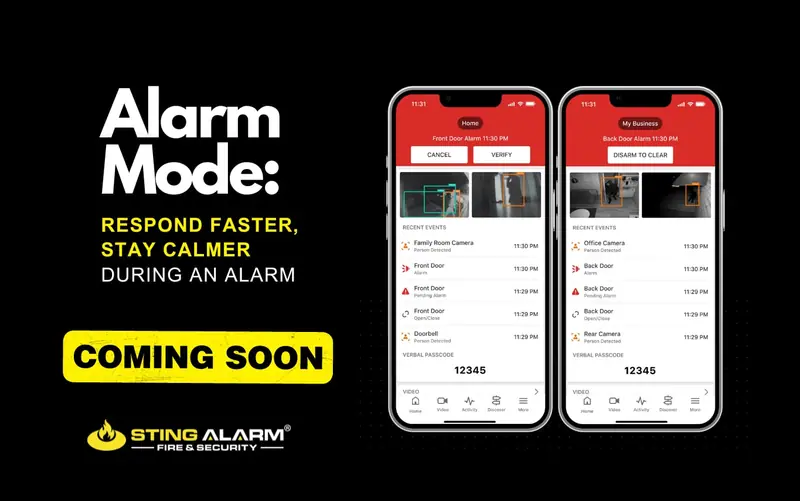
What Alarm Mode shows you
When an alarm goes off, the noise is disorienting. Is it a break-in or did someone open the back door without disarming? Alarm Mode puts the answers at the top of the app the moment the alarm starts:
- Video clips from cameras around the time of the alarm.
- A link to live camera views.
- Video doorbell and door lock status.
- Recent system activity, such as which sensor tripped and who last armed or disarmed.
Cancel or verify an alarm in one tap
If your account includes Cancel/Verify, you have a two-minute window after the alarm:
- Cancel Alarm dismisses a false alarm and sends a disarm signal.
- Verify Alarm confirms a real emergency so help can be dispatched faster.
After the two minutes, or if your account does not have Cancel/Verify, tap Disarm to Clear to resolve the alarm. Cutting false alarms matters: it avoids unnecessary police dispatches and keeps your alarms credible when you need them. See video verification for how verified alarms work.
How to get Alarm Mode
Alarm Mode is included for Alarm.com customers with a security account and app version 5.4.1 or later, and it is always on (Alarm.com: Alarm Mode). If you are a Sting Alarm customer, update the Alarm.com app and it will appear the next time your system goes into alarm.
Part of professional monitoring, not a replacement
Alarm Mode works alongside home security monitoring from our UL-listed monitoring center. The center still receives the alarm and follows your emergency plan; Alarm Mode just gives you the same picture at the same time. Questions about the app or adding cameras to your system? Call us at (702) 737-8464 or read more about smart home security.
Recent Google reviews
4.9 stars from 1,161 Google reviews★★★★★ Sting Alarm has been great to work with. Had an issue that needed a field tech to come out. Mike was dispatched and worked on the issue - quickly identifying the issue and resolving it for me. Friendly and great service!
★★★★★ I have been using STING ALARM for many years (home and office). The price for monitoring is good, but it is the customer service that keeps me. Always friendly and when an onsite visit is required, they take the time to explain the fixes/upgrades and to make sure your system is updated and working perfectly. Brayden (tech) was fantastic and went the extra mile to answer all my questions. 5 stars!
★★★★★ Mike in service is an amazing tech. This morning he came out to replace our faulty smoke detector. He was professional, efficient, really friendly and took the time to explain everything clearly. The whole process was quick and stress-free—highly recommend Mike and Sting Alarm
Frequently asked questions
What is Alarm Mode?
Alarm Mode is a screen in the Alarm.com app that appears when your security system goes into alarm. It shows video clips, a link to live cameras, and recent system activity in one place, so you can see what is happening and decide what to do.
How do I get Alarm Mode?
Alarm Mode is included for Alarm.com customers with a security account on app version 5.4.1 or later. It is always on, so keep the app updated.
Can I cancel a false alarm from Alarm Mode?
If your account has the Cancel/Verify service, you have two minutes after the alarm to tap Cancel Alarm for a false alarm or Verify Alarm to confirm a real emergency. After that, or without Cancel/Verify, use Disarm to Clear.
Does Alarm Mode replace professional security monitoring?
No. Our monitoring center still receives the alarm and follows your emergency plan. Alarm Mode gives you the same picture faster so you can cancel a false alarm or confirm a real one.